Problem: I was ask to come down to a client last Friday to troubleshoot an issue where the required Windows Update installations are stuck in Software Center for almost 2 days, although it’s confirmed that the ConfigMgr client can resolve the Site and after several restart of the machine and running M.U.A.S.S.
- Machine Policy Retrieval & Evaluation Cycle
- User Policy Retrieval & Evaluation Cycle
- Application Deployment Evaluation Cycle
- Software Updates Scan Cycle
- Software Updates Deployment Evaluation Cycle

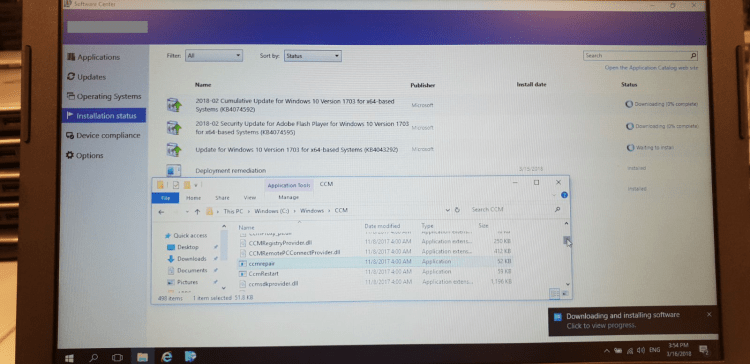
Upon investigating the failed Update I saw error 0x87D00664.

Solution: Running ccmrepair.exe managed to resolved the issue.

Steps taken:
- Clear the ccmcache folder
- In the C:\Windows\CCM – run ccmrepair as Administrator
- In the ConfigMgr client, run M.U.A.S.S.
- The wait for a while… (Patience is a virtue)
Happy Patching!



 LABDEMO
Can you please explain what “M.U.A.S.S” stands for?
Posted by Mark | March 29, 2021, 2:58 pmHi Mark, stands for the Actions in CongiMgr client:
Machine Policy Retrieval & Evaluation Cycle
User Policy Retrieval & Evaluation Cycle
Application Deployment Evaluation Cycle
Software Updates Scan Cycle
Software Updates Deployment Evaluation Cycle
Posted by Jay-R Barrios | March 29, 2021, 3:46 pmThanks. New it would be something obvious! 🙂
Posted by Mark | April 13, 2021, 12:47 pmwhat if you don’t have permission to do it even as an admin?
Posted by val | October 30, 2023, 9:34 pm