Unlocking the Full Power of Intune and Dell Management Portal
If your organization is licensed for Microsoft 365, managing devices with Microsoft Intune, and standardized on Dell Technologies hardware — you already own a powerful endpoint ecosystem.
Yet most IT teams only activate a fraction of its capabilities.
This post explores the architecture, integration points, and optimization strategy to help organizations move from basic MDM to intelligent, hardware-aware cloud management.
Executive Summary: Organizations using Microsoft 365 and Dell devices can extend Microsoft Intune with hardware-aware management through Dell Management Portal — improving security posture, operational efficiency, and device lifecycle governance at no additional cost.
1️⃣ High-Level Architecture Overview
Below is the recommended modern endpoint architecture when combining Microsoft 365 and Dell device management.
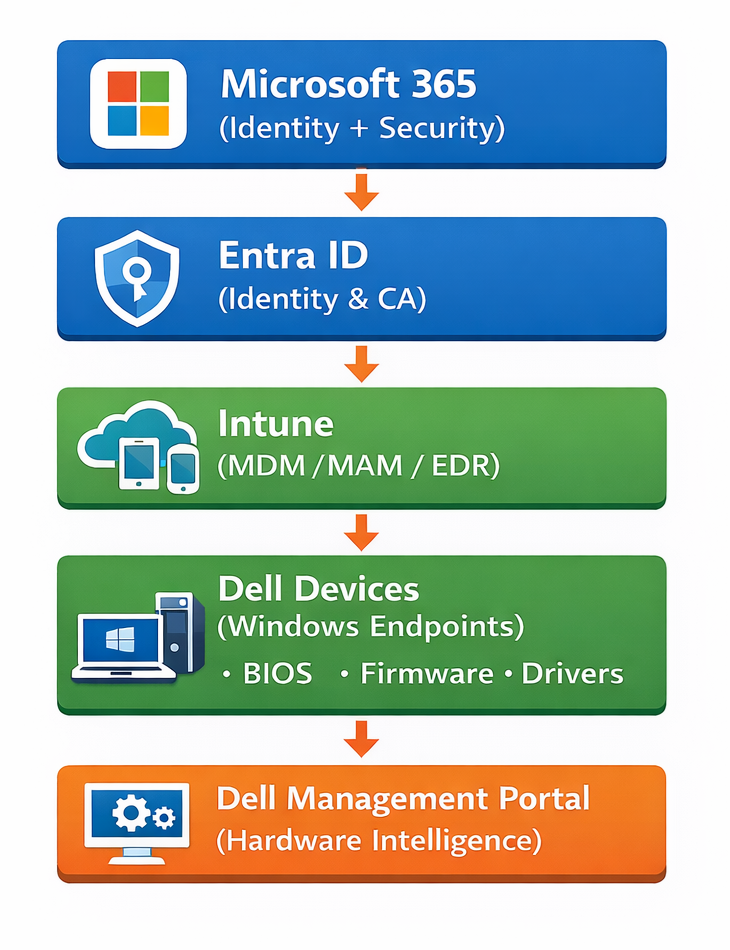
🔎 What This Architecture Enables
- Identity-driven device compliance
- Conditional Access enforcement
- Zero-touch provisioning
- BIOS & firmware governance
- Endpoint analytics
- Hardware + OS signal integration
2️⃣ Provisioning Flow – Zero Touch Deployment
Here’s how the optimized provisioning process should work:
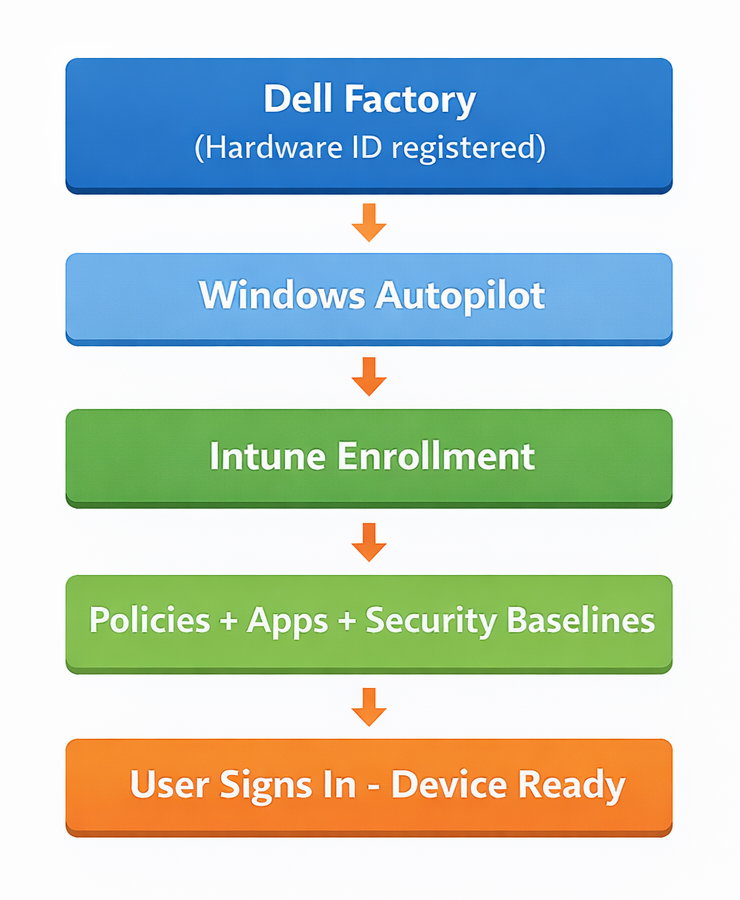
Key Components Involved:
- Windows Autopilot
- Intune Enrollment Profiles
- Configuration Profiles
- Compliance Policies
- Dell BIOS policies (via DMP)
3️⃣ Deep Dive: Where Most IT Teams Leave Value on the Table
A. Security Baselines & Attack Surface Reduction
Using Intune without enabling security baselines is like buying a sports car and never leaving first gear.
Leverage:
- Microsoft security baselines
- BitLocker enforcement
- Credential Guard
- Attack Surface Reduction rules
- Device Control policies
Tie this to Conditional Access via Microsoft Entra ID to block non-compliant endpoints automatically.
B. Endpoint Analytics – From Reactive to Proactive IT
Enable Endpoint Analytics to:
- Identify boot performance issues
- Detect unstable drivers
- Reduce helpdesk tickets
- Improve user experience metrics
This transforms IT from break/fix to data-driven optimization.
C. Hardware Governance with Dell Management Portal
The Dell Management Portal adds hardware awareness to your cloud strategy.
Why This Matters:
Windows compliance ≠ Hardware compliance.
Dell Management Portal enables:
- Remote BIOS configuration
- Firmware visibility
- Driver intelligence
- Hardware inventory normalization
This is especially valuable for:
- Regulated industries
- Security-sensitive environments
- Large distributed workforces
4️⃣ Security Signal Flow – Zero Trust in Practice
Here’s what a real Zero Trust enforcement chain looks like:
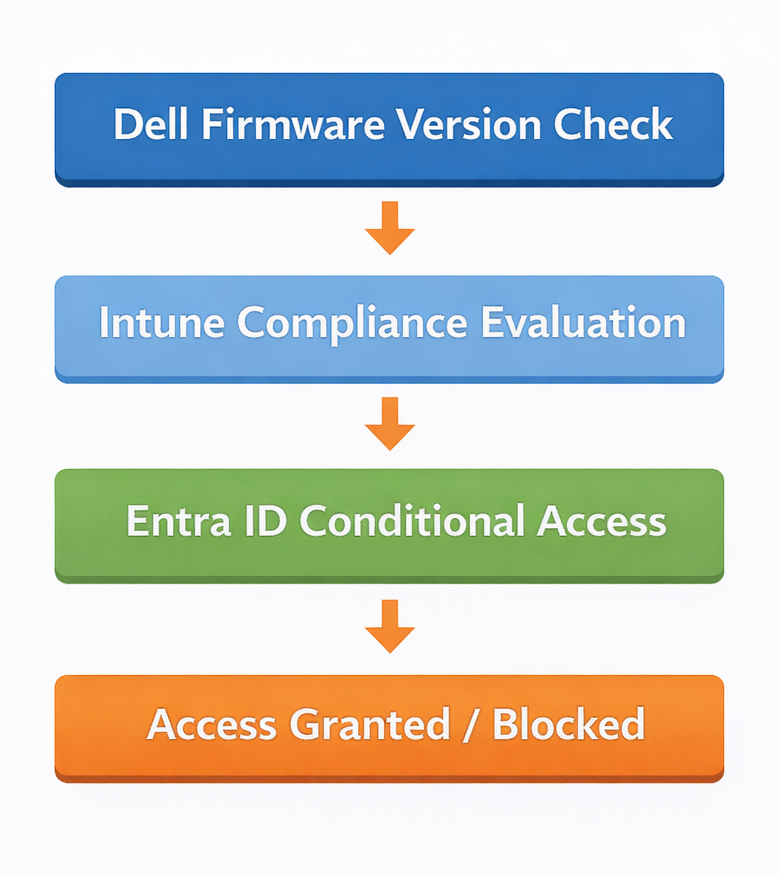
If firmware is outdated or BIOS settings deviate from baseline → device marked non-compliant → access restricted automatically.
That’s enforcement, not documentation.
5️⃣ Maturity Model for IT Leaders
| Level | Description | Tool Usage |
|---|---|---|
| Level 1 | Basic MDM | Enrollment + Apps |
| Level 2 | Secure Modern Management | Baselines + Analytics + Autopilot |
| Level 3 | Hardware-Aware Zero Trust | Dell BIOS + Firmware Governance + Signal Integration |
Most organizations never reach Level 3 — even though they already own the licensing and hardware.
6️⃣ Business Impact & ROI Framing
When presenting this internally, shift the narrative:
Instead of:
“We want to enable Dell Management Portal.”
Say:
“We want to reduce staging time, lower ticket volume, strengthen security posture, and extend hardware lifecycle.”
Leadership doesn’t fund features.
They fund outcomes.
7️⃣ Not Convinced Yet? Independent Study Validation: Measurable Operational Gains
To further reinforce the value of integrating Dell Management Portal with Microsoft Intune, an independent study conducted by Principled Technologies (February 2026) evaluated real-world endpoint management tasks comparing Dell Management Portal–enabled workflows with alternative approaches.
If architecture, security, and operational benefits are not enough, independent testing provides additional validation. The study titled Empower your IT team with cloud-based PC management using Dell Management Portal and Microsoft Intune demonstrated measurable improvements in administrative efficiency and operational productivity when using Dell Management Portal alongside Intune.
👉 Study source: https://www.principledtechnologies.com/Dell/Dell-Management-Portal-Microsoft-Intune-UEM-comparison-0226
Independent Study Validation: Measurable Operational Gains
🚀 Faster Fleet Visibility
- Accessing device information such as OS version, storage details, and service tag was completed significantly faster compared to alternative workflows.
- Administrators required fewer steps to retrieve device insights and hardware details.
- At enterprise scale, this translates to meaningful reductions in administrative effort.
⏱️ Streamlined Deployment Operations
- Application deployment and device management tasks required fewer manual steps.
- In several scenarios, tasks were completed substantially faster compared to traditional approaches.
- Efficiency gains increased as device fleet size grew.
🛠️ Unified Hardware and Endpoint Management
The study highlights the advantage of managing hardware-level configurations directly within the Intune experience, including:
- Fleet inventory visibility
- BIOS configuration
- Driver and firmware updates
- Hardware-level security controls
This reduces tool fragmentation and simplifies endpoint lifecycle management.
📊 Operational Impact for Enterprises
According to the study, organizations integrating Dell Management Portal with Intune may benefit from:
- Faster device provisioning
- Reduced operational overhead
- Improved administrative efficiency
- Better governance of hardware configurations
- More time for strategic IT initiatives
For enterprises managing large distributed device fleets, these efficiencies can significantly improve IT productivity and operational consistency.
🔍 Transparency Note
The study was commissioned by Dell Technologies. Organizations should evaluate results within the context of their own environment, operational requirements, and governance policies.
Conclusion
When Microsoft Intune and Dell Management Portal are strategically integrated, your organization moves from simply managing devices to enabling true device intelligence — where hardware visibility, security posture, compliance, and lifecycle management work together in a unified cloud experience.
Most organizations already own everything required to achieve this.
You already paid for the licensing.
You already invested in the hardware.
And the best part — Dell Management Portal is available at no additional cost for supported Dell devices.
The real question is:
Are you extracting the full value from the investments you’ve already made?
For organizations looking to improve operational efficiency, strengthen security posture, and simplify endpoint lifecycle management, Dell Management Portal provides an immediate way to extend Microsoft Intune with hardware-aware management — without additional licensing costs.
If you’re managing Dell devices today, this is one of the easiest wins you can deliver to your IT operations.
Modern endpoint management isn’t about buying more tools — it’s about fully using the powerful ones you already have.
👉 Start using Dell Management Portal today (FREE): https://manage.dell.com/
Unlock the full potential of your Microsoft 365 and Dell ecosystem — and move toward modern, intelligent endpoint management.



 LABDEMO
Discussion
No comments yet.