Installing Windows OS through USB drives has been possible since Windows Vista and Windows 7, so if you still have your bootable USB with you:
- In the USB drive create a New folder and move all the installation files of the previous OS in that folder.
- Extract the ISO file of the WindowsDeveloperPreview and copy that files in the root of the USB drive.
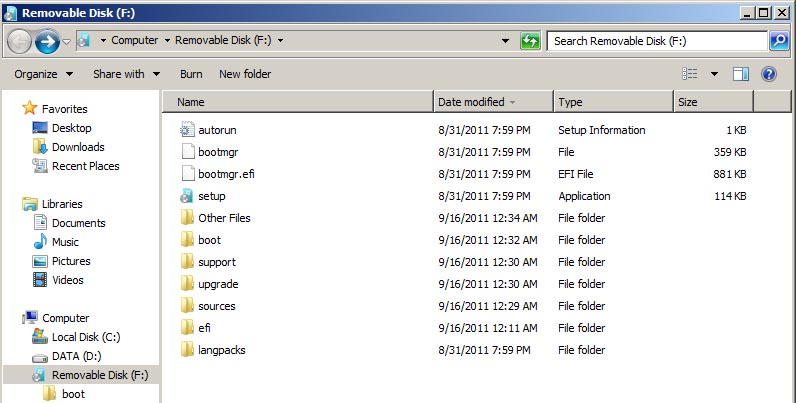 In the image above shows the copied Windows 8 files in my bootable thumb drive and the Other Files folder is where I moved the Windows 7 installation files.
If you do not have a bootable USB drive yet, you need download and install the Windows 7 USB /DVD download tool to create a Windows 8 bootable USB drive, once installed:
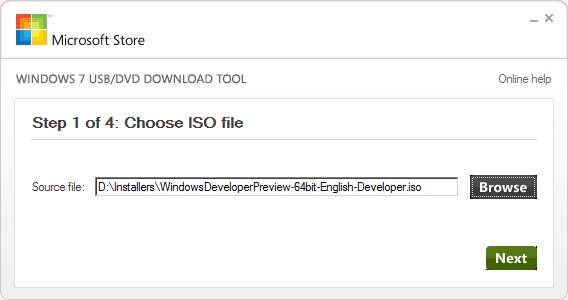
- Launch the Windows USB/DVD download tool application
- Browse for the Windows 8 ISO file
- Select a media type click on USB device
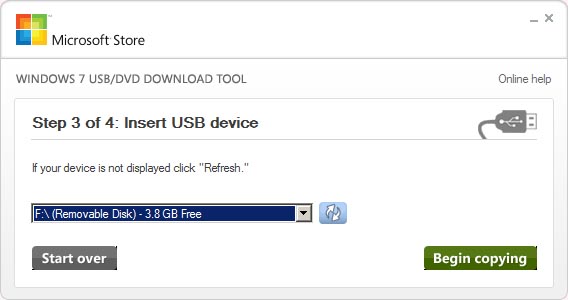
- Insert a USB drive then click Begin copying
- Creation of a bootable USB device will proceed


Windows 8 Installation

- Plug in the USB drive into the computer you want to install Windows 8 on.
- Turn the computer and boot it from the USB drive (make sure that the BIOS has been setup to allow the computer to boot from a USB drive).
- Installation of Windows 8 will begin



 LABDEMO

Discussion
No comments yet.