//
you're reading...
Uncategorized

How to manually update Win 8.1, Win Server 2012 R2 and Win Embedded 8.1

If you have TechNet/MSDN Subcriptions, download the Windows 8.1, Windows Server 2012 R2, Windows Embedded 8.1 Industry Update (x64) – (Multiple Languages) and extract the file.

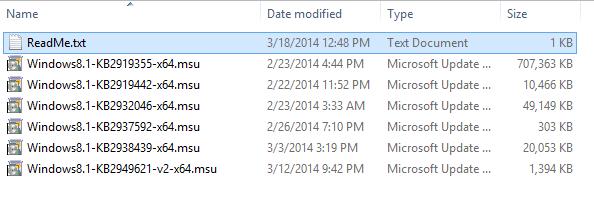
KB lists

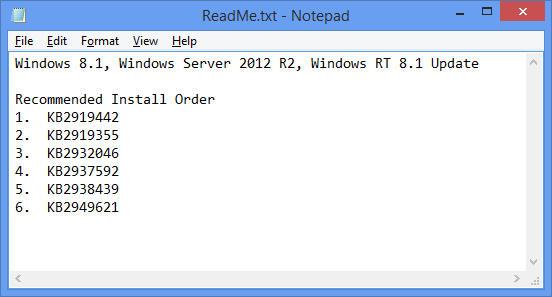
Lists of KB from the extracted file make sure to read the ReadMe.txt before proceeding.

ReadMe

It is recommended to follow the Install Order to update your Windows 8.1 and Windows Server 2012 R2.

Make sure to login as an Administrator (in my case I was using the local admin account for install the KBs)

http://www.microsoft.com/en-us/download/details.aspx?id=42162

Update for Windows 8.1 for x64-based Systems (KB2919442)

This update includes  new features and improvements, more info at http://support.microsoft.com/kb/2919355

This update includes new features and improvements, more info at http://support.microsoft.com/kb/2919355

Once done with the installing of Windows8.1-KB2919355-x64 it will ask you for a restart and after the restart you’ll notice a significant change with Windows 8.1:


Notice that the Power and Search button is now present in the Start Menu

Notice that the Power and Search button is now present in the Start Menu

The Store icon appears in the Taskbar

The Store icon appears in the Taskbar

Continue to install the rest of the updates.

Summary of the installation:

1. KB2919442
2. KB2919355 (restart required)
3. KB2932046 (restart required)
4. KB2937592
5. KB2938439 – (restart required)
6. KB2949621 – (restart required)

For more related related articles:
Exploring Windows 8.1 Update – Start Screen, Desktop and Other Enhancements
Windows 8.1 Update: The IT Pro Perspective
Managing the Store app pin to the Taskbar added in the Windows 8.1 Update

Unknown's avatar

About Jay-R Barrios

EUC Consultant | Modern Endpoint Management | Intune | SCCM | Windows | Community Leader | Microsoft MVP Alumnai

Discussion

No comments yet.

Leave a comment

Microsoft Most Valuable Professional (MVP) Alumni

Philippine Windows Users Group

Enter your email address to subscribe to this blog and receive notifications of new posts by email.

Join 40 other subscribers