
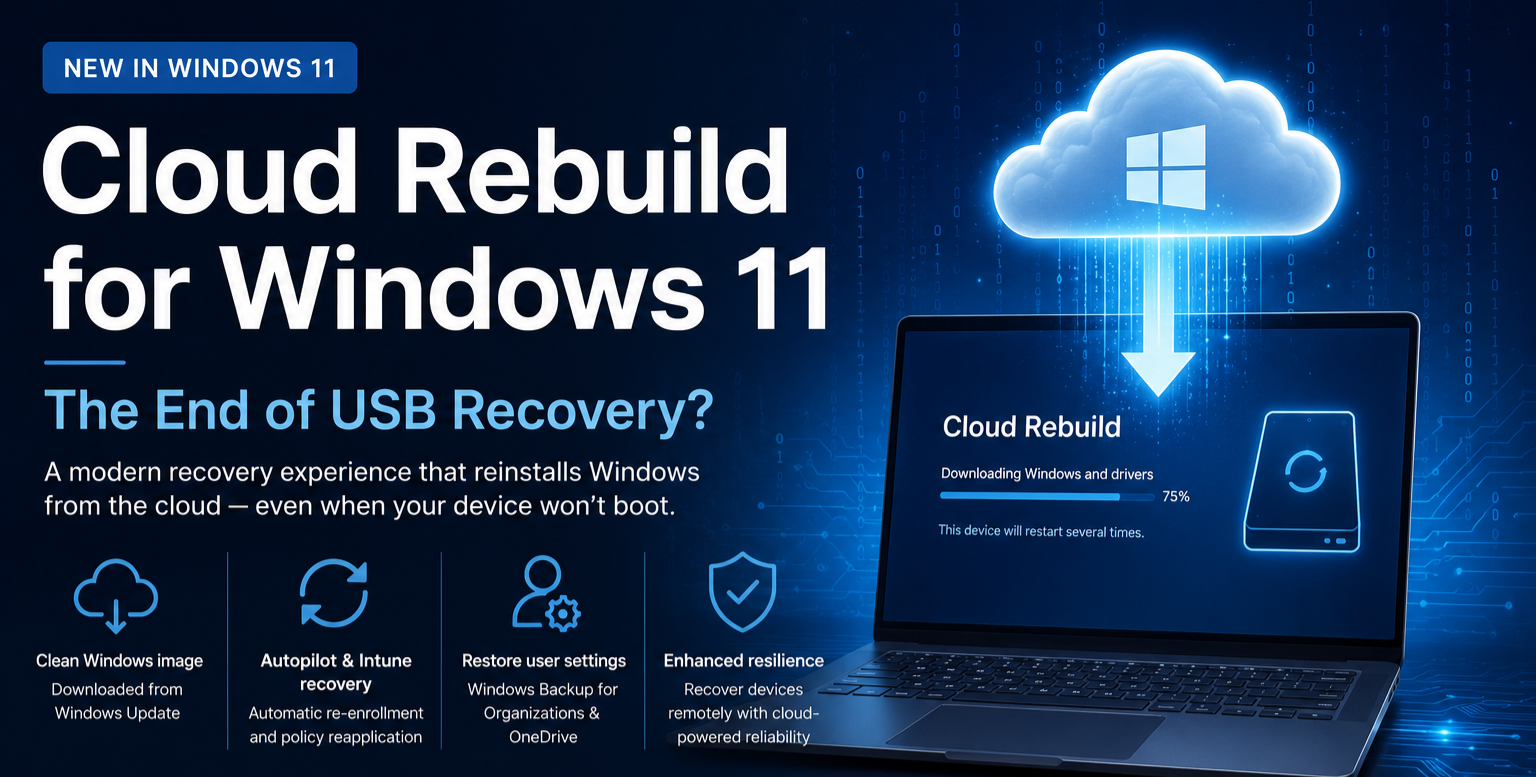

For years, recovering an unbootable Windows device has usually meant one of three things:
- Searching for a Windows installation USB
- Downloading the latest ISO
- Hoping your custom imaging solution is still up to date
Microsoft is changing that.
With Cloud Rebuild, Windows 11 introduces a modern recovery experience that can completely reinstall Windows directly from Microsoft’s cloud—even when the operating system can no longer boot.
For organizations embracing cloud-native endpoint management through Microsoft Intune and Windows Autopilot, this could significantly reduce the operational complexity of device recovery.
What is Cloud Rebuild?
Cloud Rebuild is a new Windows Recovery Environment (WinRE) capability that performs a full operating system reinstallation by downloading:
- A clean Windows image
- Device-specific drivers
- Required recovery components
directly from Windows Update.
Unlike the traditional Reset this PC experience, Cloud Rebuild does not rely on the existing Windows installation. Even if the local OS is corrupted or completely unbootable, recovery can still proceed.
How is it Different from “Reset this PC”?
| Reset this PC | Cloud Rebuild |
|---|---|
| Requires a healthy Windows installation | Works even if Windows won’t boot |
| Can use local recovery files | Downloads a fresh Windows image from Microsoft |
| Drivers are restored locally | Downloads the latest compatible drivers |
| May fail if recovery files are damaged | Independent of the existing OS |
| Optional Cloud Download | Complete Cloud Rebuild |
Think of it this way:
Reset this PC repairs your existing installation.
Cloud Rebuild replaces it entirely.
Why This Matters for Intune Administrators
For organizations managing Windows devices with Microsoft Intune, the workflow becomes much cleaner.
After Cloud Rebuild completes, the device returns to the Windows Out-of-Box Experience (OOBE) where it can automatically:
- Re-enroll into Microsoft Intune
- Register through Windows Autopilot
- Restore user settings
- Synchronize OneDrive content
- Restore organizational backup data
Essentially, the recovery process becomes part of your cloud management lifecycle instead of a manual IT operation.
Goodbye to Custom Images?
Many organizations still maintain:
- MDT deployments
- Configuration Manager task sequences
- Custom WIM files
- Driver repositories
Those approaches certainly aren’t disappearing overnight.
However, organizations already standardized on:
- Windows Autopilot
- Microsoft Intune
- Windows Update for Business
- Driver servicing through Windows Update
may find they no longer need to maintain traditional recovery media for many scenarios.
That translates into:
- Less infrastructure
- Less image maintenance
- Faster device recovery
- Lower operational overhead
Current Limitations
Since Cloud Rebuild is currently in Preview, there are a few things to keep in mind:
- It performs a clean OS reinstall.
- It requires an internet connection from Windows Recovery Environment.
- Remote initiation through Microsoft Intune is planned for a future release.
- The feature is currently available in Windows Insider builds and may change before general availability.
My Thoughts
Having spent years deploying Windows through MDT, Configuration Manager, and later Microsoft Intune, I find this to be one of the more exciting additions to Windows recovery in recent years.
The industry has steadily moved from:
USB Deployment → Network Imaging → Cloud Provisioning
Cloud Rebuild feels like the natural next step.
When paired with Windows Autopilot, Backup for Organizations, OneDrive, and Microsoft Intune, recovering a failed device could become almost as simple as connecting to Wi-Fi and letting Microsoft’s cloud do the heavy lifting.
For distributed workforces and remote employees, that’s a significant improvement.
Final Thoughts
Cloud Rebuild isn’t just another recovery option.
It’s another signal that Microsoft is continuing its shift away from traditional imaging toward cloud-native device lifecycle management.
For IT administrators, this means spending less time rebuilding machines and more time managing endpoints through policy, automation, and cloud services.
As this feature reaches general availability, it will be interesting to see how many organizations finally retire their aging USB recovery drives and custom imaging infrastructure.
Have you started testing Cloud Rebuild in your lab?
I’d love to hear your thoughts. Do you still rely on traditional imaging, or are you ready to embrace cloud-first recovery?

Leave a Reply